
Agustin
-
Posts
13 -
Joined
-
Last visited
-
Days Won
2
Agustin's Achievements






-
@berkhornet I appreciate your help. I hope this is the last favor I ask of you, could you try this version? Link.
-
@berkhornet I wanted to ask you a new favor, could you try this version: https://update.flirc.tv/skipapp/pr/1367/SkipApp-0.9.984.8944-wizard-x64.msix?token=skipAppUpdate Even if it fails, it should generate some useful logs.
-
Hello Joe, welcome. I'm not aware that the bug you're experiencing has been reported. I don't have any quick tips. I'm going to ask you to open a new topic so I can help you there, or someone else can. Please attach as much information as possible, especially the .log file that you'll find here: %localappdata%\Packages\SkipApp_nk6j7xazwq5t8\LocalState\
-
Good morning @berkhornet. Thank you. In the logs I see only one session, and the log file is from today. Just to confirm, did you test the app just once today and it worked? Or did it fail several times and only once worked?
-
Hi @berkhornet, I missed one of your messages. What you said is helpful. Could you share with me the logs generated by the app with version 0.9.984.8940?
-
To answer @marius, log files are created one per day and taking the date in UTC. When the app starts it takes the file if it is exist or creates a new one. What you say makes sense, if the file it takes is too big or corrupted or whatever, there may be some error. A new one should be created instead, and that could coincide with the second execution that @berkhornet describes. I'm just thinking, I'll do some tests in this regard.
-
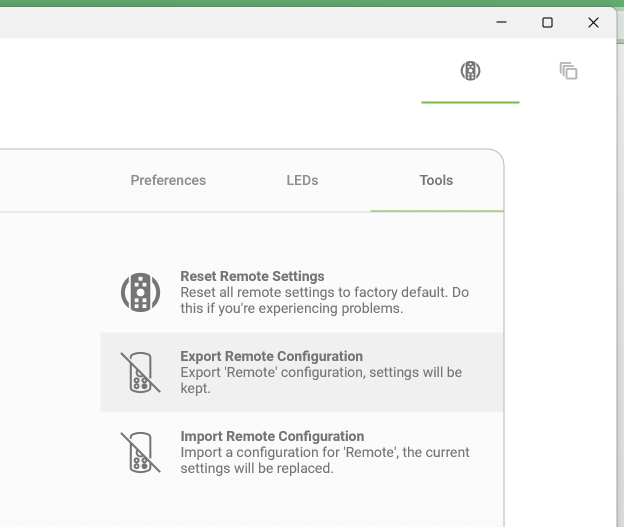
That logic that the app fails the first time and loads correctly the second time, is it only with this last version that I shared? Or does the same happen with version 0.9.984.8921? On the other hand, could you share your remote configuration? You do it by exporting as shown in the image that Jason showed. It is a .skip file.
-
Ok, thanks. I'll continue on another line then, I'll keep you posted.
-
Hello! First I want to thank you for finding and reporting this bug. As marius says, we don't have much information. I'm trying a few things, but I can't replicate it and I'd like to ask you a small favor, can you try this version?: https://update.flirc.tv/skipapp/pr/1367/SkipApp-0.9.984.8940-wizard-x64.msix?token=skipAppUpdate
-
Thank you so much. I was able to reproduce the error, I will work on it.
-
Hi! Here I am asking for your help. A bit of context: we have 2 possible flows that would trigger this error. In the attached version, I have fixed one of them. I would like you to test it, if it doesn't happen anymore it's okay. If not, I'm going to ask you to send me your log file, without doing any further action, because I've added a little more information there. Thank you so much! SkipApp-0.9.6-Beta-x64.dmg
-
First thing, thanks for the help you are giving us. I appreciate it. About the error, we have a theory related to the capabilities in the app manifest. And we have some possible solutions. I would be very grateful if someone could help us test them. I will leave here some versions of the application. I need you to install and open the app, when it fails close it and install the next one. We know some of them won't work, but we want to see the logs they throw. Lastly, please attach the file of logs. Version 5283 - Version 5284 - Version 5285 - Version 5286 - Version 5287 - Version 8288 Note: At the time of this post, the last 2 versions are being generated. The links will be valid in 30 minutes.
-
It is possible that with the new signature, by already having a previous version installed, this happens. You will need to uninstall the previous version and then install 0.9.2 Tip: before uninstalling, you can export your configuration, and after installing the new one, import it: