

Oliver Kötter
-
Posts
11 -
Joined
-
Last visited
Oliver Kötter's Achievements




-
Some odd issues after a reinstall of the app
Oliver Kötter replied to Jilas671's topic in Beta Feedback
Isn't it even possible to import a config directly from the remote on a fresh app install? -
I have the same problem and I have an AMD Ryzen on Manjaro plus Gnome.
-
Yes, on Xorg I also get an emtpy window. These are the message from console: Gtk-Message: 12:36:40.721: Failed to load module "xapp-gtk3-module" /usr/lib/gvfs/libgvfscommon.so: undefined symbol: g_task_set_static_name Failed to load module: /usr/lib/gio/modules/libgvfsdbus.so Gtk-Message: 12:36:41.069: Failed to load module "xapp-gtk3-module" /usr/lib/gvfs/libgvfscommon.so: undefined symbol: g_task_set_static_name Failed to load module: /usr/lib/gio/modules/libgvfsdbus.so /usr/lib/gvfs/libgvfscommon.so: undefined symbol: g_task_set_static_name Failed to load module: /usr/lib/gio/modules/libgvfsdbus.so /usr/lib/libproxy/libpxbackend-1.0.so: undefined symbol: g_strv_builder_unref Failed to load module: /usr/lib/gio/modules/libgiolibproxy.so /usr/lib/gio/modules/libgiognomeproxy.so: undefined symbol: g_task_set_name Failed to load module: /usr/lib/gio/modules/libgiognomeproxy.so /tmp/.mount_skip-aHR0niO/usr/lib/libgnutls.so.30: version `GNUTLS_3_6_3' not found (required by /usr/lib/gio/modules/libgiognutls.so) Failed to load module: /usr/lib/gio/modules/libgiognutls.so
-
(skip-app:6803): GLib-GIO-ERROR **: 10:01:39.083: Settings schema 'org.gnome.settings-daemon.plugins.xsettings' does not contain a key named 'antialiasing' zsh: trace trap (core dumped) ./skip-app_0.9.955+6989_amd64.AppImage Manjaro Linux, Kernel 6.6.8, Gnome Desktop
-
As long as the Linux version does not work I am unable to test.
-
What do you mean by profile TV? TV is a Philips 65PUS9435 with Android TV. No Flirc USB. Config is attached. Wohnzimmer-2023-08-04.skip
-
Which post? What did you do? I still have this problem.
-
On a Philips 65PUS9435 Android TV.
-
I use Kodi and have the problem that even very short keystrokes invoke certain actions repeatedly, e.g. - on screen keyboards: one key right press skips a whole keyboard button - I use Kodi's skip steps (https://kodi.wiki/view/Skip_steps) and when I triple press the right key, a quadruple or quintuple press is triggered How can I fix this?
-
No control over Leds Brightness & Leds Timeout ?
Oliver Kötter replied to c.dennis's topic in Skip 1s
How do you even change these settings? Mine are always greyed out. Skip App 0.9.70.5777 (Nightly), Firmware version 4.12.11-4-g394f15d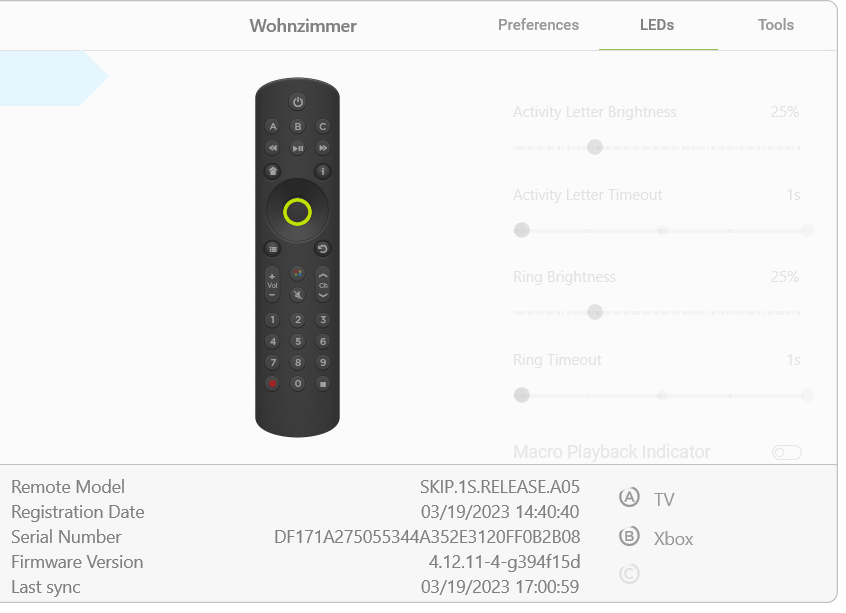
-
I second this request. It should be possible to share codes in this community or use them if found elsewhere in the net.